

- Scope (SharePoint Level Permission ID)
Purpose: Composes SharePoint role definition IDs for Read, Contribute, and Full Control.
Actions: Compose Read, Contribute, and Full Control role IDs. - Initialize Variable
Initializes PrincipalIds array with user IDs and role IDs. - Condition: Break Inheritance
Controls whether inheritance is broken or reset.
If True: Break inheritance and assign permissions per user.
If False: Reset inheritance to parent.
Here’s a brief documentation for each action in your flow:
Trigger: manual
Who can trigger the flow?* Anyone
Request Body JSON Schema
{
    "type": "object",
    "properties": {
        "ItemID": {
            "type": "string"
        },
        "ListName": {
            "type": "string"
        },
        "BreakInheritance": {
            "type": "boolean",
            "default": false
        },
        "RemoveExistingPermission": {
            "type": "boolean",
            "default": false
        },
        "EdocsAccessLevelID": {
            "type": "number",
            "default": 0
        },
        "FullControlAccessLevelID": {
            "type": "number",
            "default": 0
        },
        "EdocsEditAccessLevel": {
            "type": "number",
            "default": 0
        },
        "InitiatorID": {
            "type": "number",
            "default": 0
        }
    }
}
1. Scope_(SharePoint_Level_Permission_ID)
- Purpose: Composes SharePoint role definition IDs for Read, Contribute, and Full Control.
- Actions:
- Compose_(Role_ID_-_Read): Outputs the role ID for Read permission.
- Compose_(Role_ID_-_Contribute): Outputs the role ID for Contribute permission.
- Compose_(Role_ID_-_Full_Control): Outputs the role ID for Full Control permission.
2. Initialize_variable

📌 Initialize Variable: PrincipalIds
In the screenshot above, we are initializing an array variable called PrincipalIds. This array acts as a collection of user-role mappings that will later be used to assign permissions programmatically.
🧱 Structure of the Array
Each item in the array contains two key properties:
id→ Represents the SharePoint principal (user or group ID)role→ Represents the permission level (role definition ID)
Here is the equivalent structure in JSON format:
[
  {
    "id": "EdocsAccessLevel",
    "role": "ReadRoleId"
  },
  {
    "id": "EdocsEditAccess",
    "role": "ContributeRoleId"
  },
  {
    "id": "InitiatorID",
    "role": "ContributeRoleId"
  },
  {
    "id": "FullControlAccess",
    "role": "FullControlRoleId"
  }
]
⚙️ What’s Happening in the Flow
- The
idvalues are dynamically pulled from previous steps or trigger inputs (e.g., SharePoint columns or user fields). - The
rolevalues come from earlier Compose actions, where SharePoint Role Definition IDs (Read, Contribute, Full Control) are defined.
This design allows the flow to:
- Handle multiple users in one go
- Assign different permission levels dynamically
- Keep the logic clean and reusable
🔁 Why Use an Array Here?
Instead of hardcoding multiple permission steps, this approach allows you to:
✅ Loop through users using Apply to Each
✅ Call a single HTTP request action for all assignments
✅ Easily extend or modify permissions without restructuring the flow
🚀 Pro Tip
By storing permissions in an array like this, you can:
- Pass data between scopes more easily
- Debug permission assignments faster
- Reuse this pattern across multiple flows
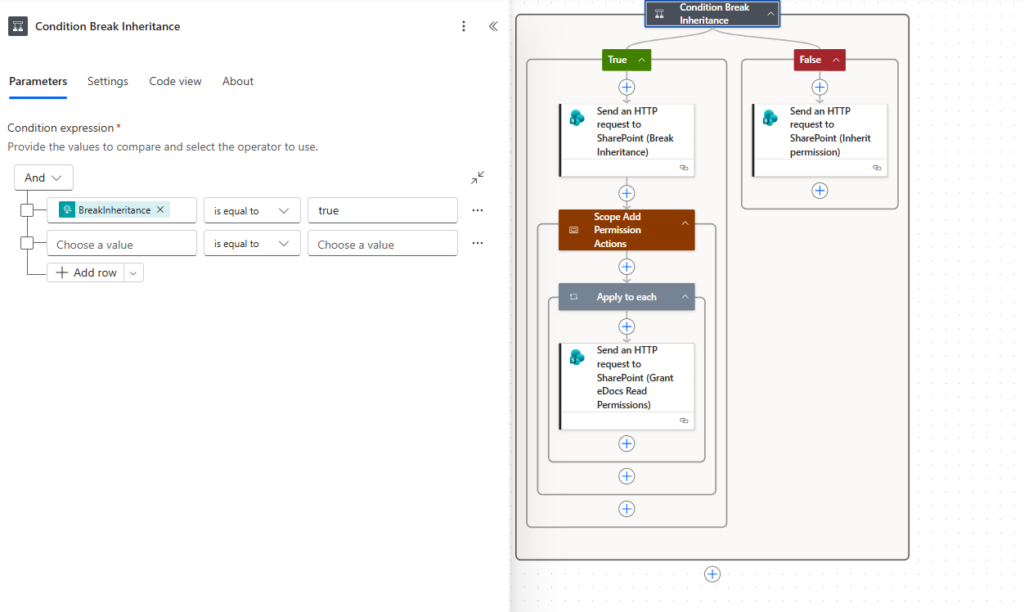
🔀 Controlling SharePoint Permissions with Conditional Logic
A critical part of building flexible permission flows in Power Automate is deciding when to break inheritance and when to keep it intact. In this section of the flow, we introduce a condition that controls how permissions are applied to a SharePoint item.
📌 Condition: Break Inheritance
The condition evaluates a boolean value called BreakInheritance.
- If
BreakInheritance = true→ The flow breaks permission inheritance and assigns custom permissions

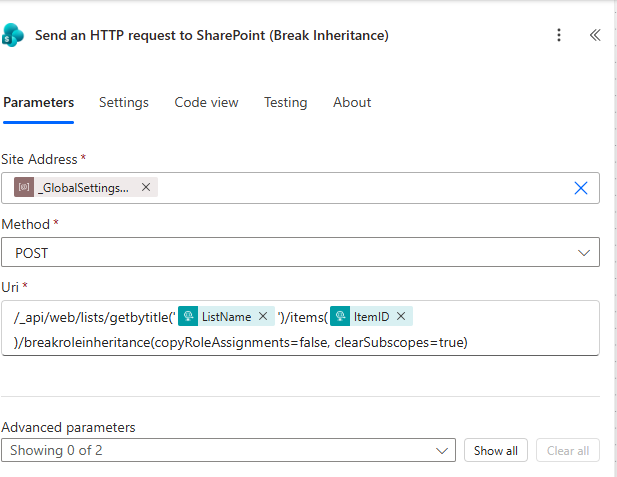
📌 Action: Break Role Inheritance
In this step, we use the Send an HTTP request to SharePoint action to break permission inheritance on a specific list item.
🔧 Configuration
- Method:
POST - URI:
_api/web/lists/getbytitle('ListName')/items(ItemID)/breakroleinheritance(copyRoleAssignments=false, clearSubscopes=true)⚙️ What This Action Does
When this request runs, SharePoint:
✅ Breaks the connection to inherited permissions
✅ Removes all existing role assignments (because copyRoleAssignments=false)
✅ Clears any unique permissions in child scopes (because clearSubscopes=true)
✅ Prepares the item for fresh, fully controlled permission assignment
This essentially gives you a clean slate to define exactly who has access and what level of access they should have.
🔍 Understanding the Parameters
Let’s break down the important parts of this request:
🔹 ListName
- Dynamically passed from your flow
- Identifies the SharePoint list or library
🔹 ItemID
- The ID of the specific item you want to secure
- Usually comes from the trigger or a previous action
🔹 copyRoleAssignments=false
- False = Do NOT copy existing permissions
- Ensures you start with zero permissions on the item
🔹 clearSubscopes=true
- Removes any unique permissions from child objects
- Keeps your permission structure clean and consistent
🔄 Where This Fits in Your Flow
This action runs in the True branch of your condition:
“If BreakInheritance = true → Break inheritance and assign custom permissions”
It is immediately followed by your permission assignment logic, where:
- The
PrincipalIdsarray is used - Roles are applied via additional HTTP requests
🚀 Pro Tip
If your requirement is to keep existing permissions and just add more, change the parameter:
copyRoleAssignments=true
- er-automate.co
Auto
Copilot said:
Copilot
Here’s a clean blog post section based on your “Inherit Permission” HTTP request action:
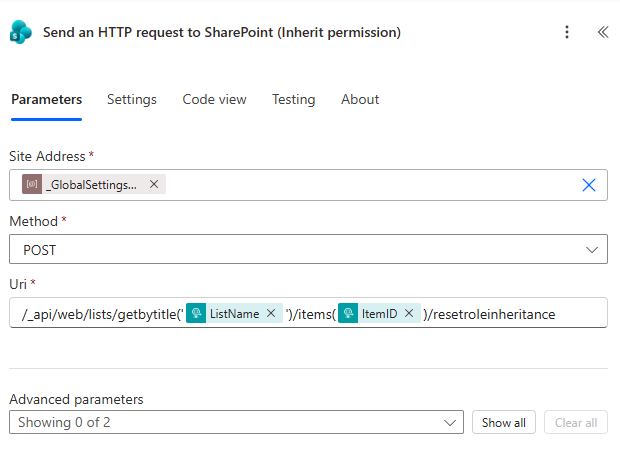
🔁 Resetting SharePoint Permissions Using REST API
In scenarios where custom permissions are no longer required, it’s important to restore the default SharePoint security model. This is where the “Inherit Permission” HTTP action plays a critical role in your Power Automate flow.
📌 Action: Restore Role Inheritance
In the screenshot above, we use a Send an HTTP request to SharePoint action configured as follows:
- Method:
POST - URI:
Plain Text
_api/web/lists/getbytitle(‘ListName’)/items(ItemID)/resetroleinheritance
This endpoint instructs SharePoint to remove unique permissions from the item and reapply permissions from its parent (library or folder).
⚙️ What This Action Does
When this request is executed, SharePoint will:
✅ Remove all unique role assignments on the item
✅ Restore inherited permissions from the parent container
✅ Ensure consistency with library-level security
✅ Simplify permission management
This is especially useful when:
- Custom access is no longer needed
- A document lifecycle stage has changed
- You want to avoid permission sprawl
🔍 Breaking Down the URI
Let’s look at the dynamic components used in your flow:
ListName→ Comes from a dynamic variable or parameterItemID→ Refers to the specific SharePoint list itemresetroleinheritance→ The REST method that resets permissions
Because these values are dynamic, the same flow can work across:
- Multiple lists
- Different items
- Various use cases
🔄 Where This Fits in Your Flow
This action runs in the False branch of your condition:
“If BreakInheritance = false → Reset permissions”
Instead of assigning custom roles, the flow:
- Skips permission assignment logic
- Calls this endpoint
- Returns the item to its default security state
🚀 Pro Tip
If your flow switches frequently between custom and inherited permissions:
- Always ensure you call
resetroleinheritancebefore reapplying inheritance - Avoid mixing manual permission changes with automated ones
- Log actions (optional) to track when inheritance is reset
💡 Summary
The resetroleinheritance endpoint is an essential part of any robust permission automation strategy. It ensures that your solution remains:
- Clean
- Maintainable
- Aligned with SharePoint best practices
By incorporating this step into your condition logic, you give your flow the flexibility to both customize and standardize permissions on demand.
If you want, I can also:
- Write the Break Inheritance HTTP request section
- Combine all sections into a full blog post for power-automate.co.za
- Add exact headers + body examples for the API calls
Just tell me 👍
You said:
extract the text
Copilot said:
Copilot
Here is the extracted text from your image:
Send an HTTP request to SharePoint (Break Inheritance)
Parameters
Site Address
_GlobalSettings…
Method
POST
Uri
_api/web/lists/getbytitle('ListName')/items(ItemID)/breakroleinheritance(copyRoleAssignments=false, clearSubscopes=true)
Advanced parameters
Showing 0 of 2
If you want, I can also turn this into a clean blog explanation section (like the others) 👍
You said:
go
Copilot said:
Copilot
Here’s a polished blog post section for your Break Inheritance HTTP request step:
🔓 Breaking SharePoint Permission Inheritance with Power Automate
To assign custom permissions in SharePoint, the first and most important step is to break the inherited permissions from the parent container. Without doing this, SharePoint will continue to enforce library-level or folder-level security, preventing any item-specific access control.
📌 Action: Break Role Inheritance
In this step, we use the Send an HTTP request to SharePoint action to break permission inheritance on a specific list item.
🔧 Configuration
- Method:
POST - URI:
Plain Text
_api/web/lists/getbytitle(‘ListName’)/items(ItemID)/breakroleinheritance(copyRoleAssignments=false, clearSubscopes=true)
⚙️ What This Action Does
When this request runs, SharePoint:
✅ Breaks the connection to inherited permissions
✅ Removes all existing role assignments (because copyRoleAssignments=false)
✅ Clears any unique permissions in child scopes (because clearSubscopes=true)
✅ Prepares the item for fresh, fully controlled permission assignment
This essentially gives you a clean slate to define exactly who has access and what level of access they should have.
🔍 Understanding the Parameters
Let’s break down the important parts of this request:
🔹 ListName
- Dynamically passed from your flow
- Identifies the SharePoint list or library
🔹 ItemID
- The ID of the specific item you want to secure
- Usually comes from the trigger or a previous action
🔹 copyRoleAssignments=false
- False = Do NOT copy existing permissions
- Ensures you start with zero permissions on the item
🔹 clearSubscopes=true
- Removes any unique permissions from child objects
- Keeps your permission structure clean and consistent
🔄 Where This Fits in Your Flow
This action runs in the True branch of your condition:
“If BreakInheritance = true → Break inheritance and assign custom permissions”
It is immediately followed by your permission assignment logic, where:
- The
PrincipalIdsarray is used - Roles are applied via additional HTTP requests
🚀 Pro Tip
If your requirement is to keep existing permissions and just add more, change the parameter:
Plain Text
copyRoleAssignments=true
This will:
- Retain current permissions
- Allow you to extend access without wiping existing users
💡 Summary
The breakroleinheritance endpoint is the foundation of any advanced SharePoint permission automation. It allows you to:
- Move away from static, inherited permissions
- Fully control access at the item level
- Build scalable, dynamic permission solutions
Combined with conditional logic and dynamic arrays, this approach turns Power Automate into a powerful access control engine for SharePoint.
If you want, I can now:
- Combine all sections into a full blog article for power-automate.co.za
- Add actual HTTP headers + body examples
- Create a diagram of the full flow (very useful for blogs)
Just say 👍
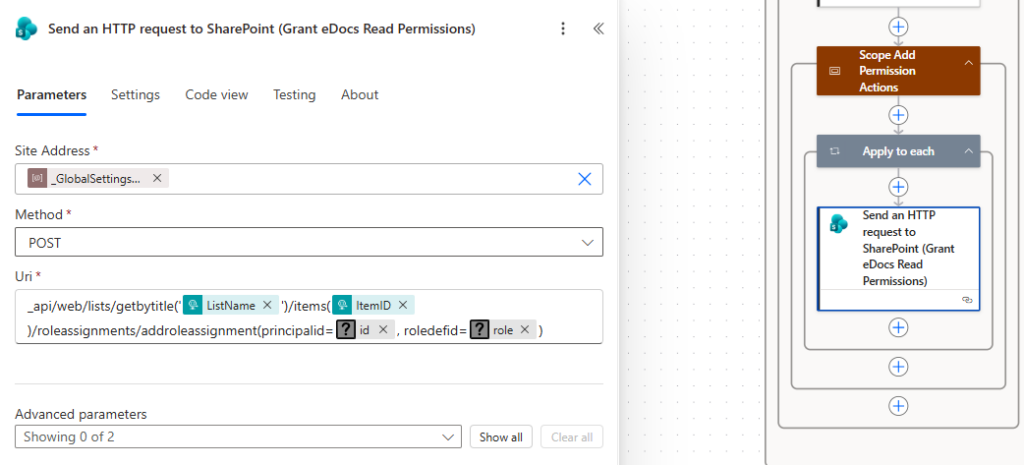
✅ Assigning SharePoint Permissions via REST API
Once inheritance has been broken, the next step in the flow is to assign permissions dynamically to users or groups. This is achieved using another Send an HTTP request to SharePoint action inside an Apply to Each loop.
📌 Action: Grant eDocs Read Permissions
In the screenshot above, this action is responsible for assigning a specific role (permission level) to a SharePoint principal (user or group).
🔧 Configuration
- Method:
POST - URI:
_api/web/lists/getbytitle('ListName')/items(ItemID)/roleassignments/addroleassignment(principalid=ID, roledefid=ROLEID)⚙️ What This Action Does
This REST API call tells SharePoint to:
✅ Assign a permission level to a specific user or group
✅ Attach the role definition (Read, Contribute, Full Control, etc.)
✅ Apply permissions directly to the item (since inheritance is already broken)
Each time this action runs, one permission assignment is created.
🔍 Breaking Down the Parameters
🔹 principalid
- The SharePoint User ID or Group ID
- Comes from the
PrincipalIdsarray (idproperty) - Identifies who gets access
🔹 roledefid
- The Role Definition ID (permission level)
- Comes from your earlier Compose actions (
roleproperty) - Defines what access level is granted
🔁 Looping Through Multiple Users
This action runs inside an Apply to Each loop, which iterates through the PrincipalIds array.
For each item in the array:
- A user/group ID is retrieved
- A role ID is retrieved
- A permission assignment is created via the HTTP request
This makes the solution:
✅ Fully dynamic
✅ Easy to extend
✅ Scalable for multiple users and roles
🧱 Example Mapping
Your array structure might look like this:
{
  "id": 15,
  "role": 1073741826
}
Which translates to:
- Assign Contribute access (
1073741826) - To User/Group ID 15
🚀 Pro Tip
If you need to assign multiple roles to the same user, you can:
- Add multiple entries in the array with the same
id - Use different
roledefidvalues
This avoids complex branching and keeps everything data-driven.
⚠️ Important Considerations
- This action only works if inheritance is already broken
- Ensure that your IDs are valid (invalid IDs will cause the request to fail)
- Always test with a small dataset before scaling up
💡 Summary
The addroleassignment endpoint is the engine that powers dynamic permission assignment in SharePoint.
Combined with:
- Your
PrincipalIdsarray - The Apply to Each loop
- The conditional inheritance logic
…it creates a fully automated, flexible permission management system inside Power Automate.
- If
BreakInheritance = false→ The flow resets permissions to inherit from the parent

This gives you full control over whether an item should follow standard SharePoint permissions or have unique access configured.

